

Real news, real insights – for small businesses who want to understand what’s happening and why it matters.
AI Security Cameras Are Quietly Watching More Than You Think
By Vicky Sidler | Published 17 December 2025 at 12:00 GMT+2
You bought the smart security camera to keep your business safe. Motion alerts? Great. Night vision? Sure. Facial recognition? Fancy. But now it turns out the camera might also be spying on your neighbor’s face, your license plate, and possibly your toddler’s birthday party.
According to a new Surfshark study, the real risk with modern AI-powered security cameras isn't just what they capture. It’s what they quietly send, store, and share behind the scenes—with or without your knowledge.
TL;DR:
AI security cameras now include facial and vehicle recognition
Your neighbors might be recorded without consent
Companion apps collect more data than you think
That data often goes back to the manufacturer’s servers
Some apps collect up to 15 types of personal information
👉 Need help getting your message right? Download the 5-Minute Marketing Fix.
Table of Contents:
AI Security Cameras Are Quietly Watching More Than You Think
What Your Camera Might Be Collecting:
The Risk Isn’t Just Data Collection:
So What Can Small Business Owners Do?
2. Turn Off What You Don’t Need:
This Isn’t Just a Tech Problem:
1. OpenAI's $27B Loss Could Tank the Whole AI Industry
2. Brand Guidelines for Small Business
3. Ideal Client Profile: The Marketing Shortcut Small Businesses Miss
Frequently Asked Questions About AI Security Cameras and Privacy
1. What makes AI security cameras different from regular ones?
2. Can my AI camera record my neighbors without their consent?
3. What kind of personal data do companion apps collect?
4. Which brand collects the most data?
5. Is it legal for these cameras to collect biometric data?
6. Can these cameras be hacked?
7. Should I use third-party services with my camera?
8. What’s the most privacy-friendly brand in the study?
9. How can small business owners protect their data and customers' trust?
Not Just a Camera Anymore:
Six out of the eight top camera brands now offer facial recognition. Seven can identify vehicles. All can spot people and send intelligent alerts. That sounds useful until you realize it’s not just about spotting a delivery guy anymore.
It’s about turning your storefront, driveway, or office hallway into a biometric data point for someone else’s analytics engine.
And here's the fun part. These cameras don’t just work on their own. They rely on companion apps to function. Those apps? They're quietly hoovering up your personal details. Not just names and emails, but location, contact lists, and even photos and videos.
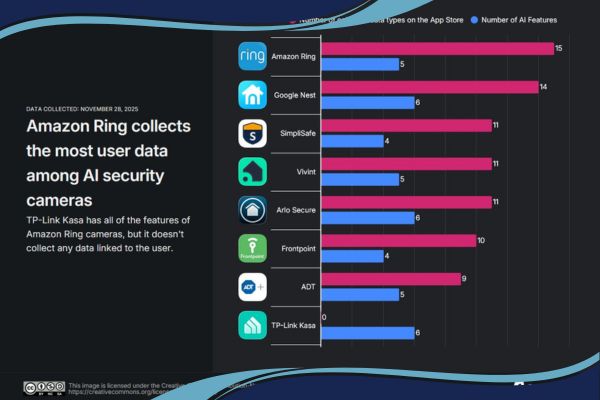
According to the study, Amazon Ring collected the most, with 15 unique data types. Google Nest followed closely with 14. That’s not just overkill. That’s an open buffet of customer data.
What Your Camera Might Be Collecting:
Let’s take Amazon Ring as an example. It doesn’t just collect images. It gathers:
Your physical address
Phone number
Email
Device and user IDs
Purchase history
And ten extra types of data labelled “Other Purposes”
No explanation. No specifics. Just a vague label that feels like the digital version of “miscellaneous drawer.”
Some brands also feed your device ID to third-party advertisers. Arlo was the worst in this category, sharing more types of ad-related data than any other brand studied.
But Isn’t This All Legal?
That depends on where you live.
In the EU and UK, facial recognition features are tightly regulated under GDPR
In the US, Canada, and Australia, rules vary by region and are generally more relaxed
So just because it’s legal somewhere doesn’t mean it’s ethical or secure. Especially if the people being recorded don’t even know it’s happening.
Miguel Fornes, cybersecurity expert at Surfshark, summed it up well:
“When people can’t meaningfully opt in or out, and are not informed about where their biometric data is stored... you’ve created a privacy hazard.”
Recording your neighbor’s face or car plate without consent? That’s not just awkward. That might be illegal depending on your country’s laws.
The Risk Isn’t Just Data Collection:
It’s what happens after the data is collected.
These cameras often stream everything back to the company’s servers. That creates a second, quieter surveillance stream. One that hackers can access if the camera has a known vulnerability.
And it doesn’t take much. Fornes says there are entire platforms online that list compromised cameras. All you need is a link, a little curiosity, and suddenly you're watching someone else’s living room in real time.
So What Can Small Business Owners Do?
1. Choose the Right Brand:
Surfshark named TP-Link as the most privacy-conscious option. It collects the least data and turns off risky third-party connections by default.
2. Turn Off What You Don’t Need:
If you don’t use facial recognition or vehicle alerts, disable them. You don’t need to accidentally scan your mail carrier into some server in another country.
3. Read the Fine Print:
Yes, the privacy policy is boring. Yes, you should still read it. If you see things like “Other Purposes,” ask yourself why the app needs that data.
4. Use It Like It’s Public:
Assume every recording could be seen by someone who shouldn’t see it. Act accordingly. Don’t point cameras where they could capture people who haven’t agreed to be filmed.
5. Protect Your Ecosystem:
Avoid third-party plugins unless you understand what they do. Stick to native apps where possible. Simpler systems usually mean fewer leaks.
This Isn’t Just a Tech Problem:
It’s a trust problem.
If a customer walks into your shop and sees a camera with facial recognition, they might wonder:
Where does that data go?
Is it shared with anyone?
Can I ask for it to be deleted?
If you can’t answer those questions confidently, you’re not just risking bad PR. You might be risking your legal compliance.
And here’s where it ties back to marketing. Customers do business with people they trust. If your tech setup undermines that trust, no amount of clever copywriting or social proof will fix it.
Want help building a clear message that earns trust from the first sentence?
Download the 5-Minute Marketing Fix and learn how to describe your business in a way that makes people feel safe, informed, and respected.
Related Articles:
1. OpenAI's $27B Loss Could Tank the Whole AI Industry
Your current article warns about the privacy risks of AI hardware. This post explores the financial risks of the companies behind the tech. If you're betting on AI, you should know whether the engine might stall.
2. Brand Guidelines for Small Business
If privacy issues erode trust, brand guidelines are how you build it. This article helps you create clear, consistent messaging that earns customer confidence.
3. Ideal Client Profile: The Marketing Shortcut Small Businesses Miss
Your cameras might be capturing people who will never buy from you. This post flips that into a strength by teaching you how to define and reach your ideal clients—intentionally, not accidentally.
Frequently Asked Questions About AI Security Cameras and Privacy
1. What makes AI security cameras different from regular ones?
AI cameras use facial recognition, vehicle detection, and person tracking to analyze what they capture, not just record it. This means they collect biometric data and may identify or profile individuals automatically.
2. Can my AI camera record my neighbors without their consent?
Yes, and that’s the problem. Most cameras don’t have boundaries beyond your property line. Recording people who haven’t given permission—like neighbors or delivery drivers—raisesc serious privacy concerns and could violate local laws.
3. What kind of personal data do companion apps collect?
Beyond video footage, apps may gather your physical address, email, phone number, device IDs, contact info, usage patterns, and more. Some group vague items under “Other Purposes” without clear explanation.
4. Which brand collects the most data?
According to the Surfshark study, Amazon Ring collects the most, with 15 unique user data types. Google Nest follows closely with 14.
5. Is it legal for these cameras to collect biometric data?
That depends on your country. In the EU and UK, biometric data like facial recognition is strictly regulated under GDPR. In the US, Canada, and Australia, laws vary by state or province and are generally less strict.
6. Can these cameras be hacked?
Yes. If the camera has a known vulnerability, hackers can take control. There are even websites that list compromised webcams, making it easier for bad actors to spy on others.
7. Should I use third-party services with my camera?
Generally, no. Third-party plugins increase your risk exposure. Stick with the camera’s native ecosystem unless you fully understand what the external service is doing.
8. What’s the most privacy-friendly brand in the study?
TP-Link ranked best in terms of privacy. It collects the least data and disables third-party connections by default.
9. How can small business owners protect their data and customers' trust?
Disable features you don’t need, read privacy policies carefully, and avoid pointing cameras where people haven’t consented to being recorded. And always prioritize trust over convenience.
10. What does this have to do with marketing?
Privacy builds or breaks trust. If customers feel monitored or unsafe, they’ll hesitate to buy from you. Clear, respectful communication—starting with your tech choices—sets the tone for everything else.
👉 Need help getting your message right? Download the5-Minute Marketing Fix.



Strategic Marketing Tribe helps established service businesses turn underperforming marketing into more predictable growth with the Failure-Proof Marketing System.






Created with clarity (and coffee)